
Every editor knows the relief of a progress bar that hits 100% on the first try. When you’re moving 4K or 6K footage across continents, the right transfer tool turns a potentially stressful overnight upload into a dependable, verifiable delivery.
This guide compares the top professional tools—MASV, Frame.io, WeTransfer, and IBM Aspera—using real-world proof points: checksums, resumable transfers, and speed under real network conditions.
What You’ll Learn in This Guide
- Which tool moves 200GB–2TB the fastest
- How to send proxies for same-day editing while originals transfer overnight
- Why TCP-based cloud storage fails over long distances
- A step-by-step workflow with checksum verification
- Security baseline for production houses
Best Picks by Scenario
Choose based on your main bottleneck: delivery speed, client approvals, or enterprise governance.
- Fastest for 200GB–2TB deliveries: MASV
- Best for client approvals + team review: Frame.io (Transfer app + feedback)
- Best for quick one-off exports: WeTransfer
- Best for high-latency enterprise scale: IBM Aspera FASP
- Best security baseline: TLS + passwords + expiry links + checksums
Why Standard Cloud Storage Fails at Scale
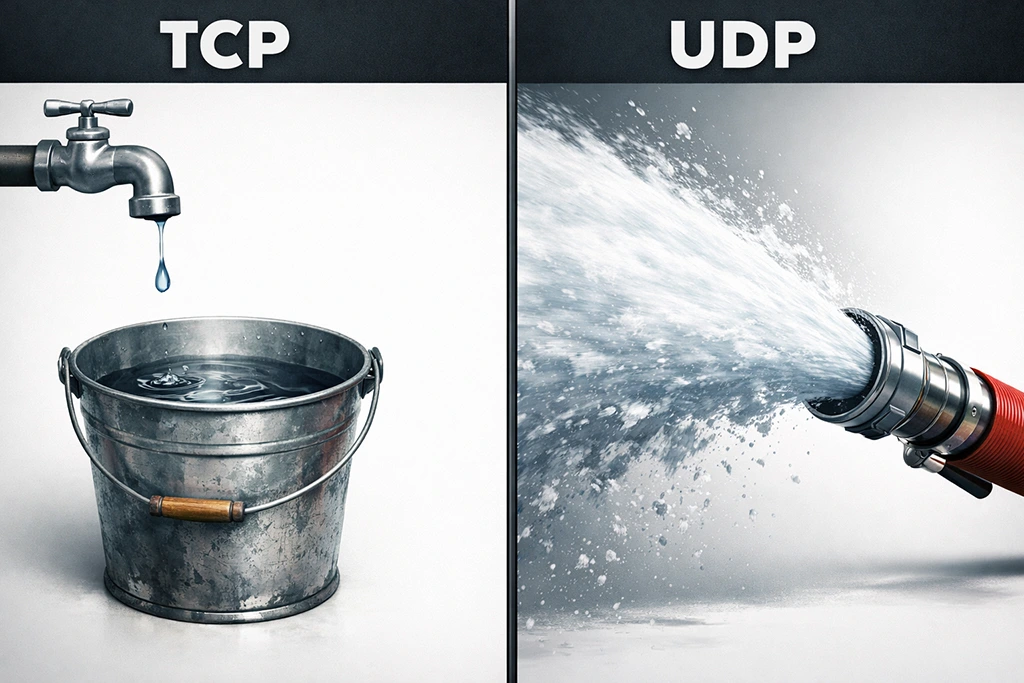
Upload speed is only step one—latency, packet loss, and fragile uploaders ruin “theoretical” Mbps.
Standard tools like Google Drive use TCP (Transmission Control Protocol), which requires a “handshake” confirmation for every data packet. Over long distances (e.g., sending footage from a documentary shoot in Bangladesh to London), the latency between handshakes creates bottlenecks.. You might have 1Gbps available, but TCP only uses a fraction due to this “stop-and-wait” behavior.
Professional video tools use UDP (User Datagram Protocol) or hybrid acceleration. These blast data continuously without waiting for individual confirmations, often achieving speeds 10x to 100x faster.
Real-world context: As of November 2025, Ookla reported U.S. median fixed broadband at 302.68 Mbps down but only 59.18 Mbps up. That upload figure explains why “200GB in an afternoon” often turns into overnight.
Transfers fail for boring reasons:
- Upload speeds are weaker than download (asymmetric connections)
- Latency and packet loss punish long-haul routes
- Browser fragility (sleep mode, VPN drops, Wi-Fi roaming kill uploads)
- Disk/CPU limits when hashing large folder trees
Top File Transfer Tools Compared
| Tool | Best For | Speed Factors | Security | Pricing |
|---|---|---|---|---|
| MASV | Huge camera-original deliveries | UDP/TCP hybrid optimized for real-world routes | TLS + passwords + expiry; TPN Gold Shield | Usage-based (~$0.25/GB) |
| Frame.io | Review + approvals + team handoff | Transfer app for large batches | Strong permissioning; SOC 2 Type 2 | Subscription tiers |
| WeTransfer | Quick client exports | Browser-dependent; route quality varies | TLS in transit + optional passwords | Free + paid plans |
| Aspera | Enterprise broadcast/long-distance | FASP (proprietary UDP) immune to latency | Enterprise-grade encryption | Custom licensing |
Use MASV for raw footage delivery; Frame.io for creative feedback; WeTransfer for final small exports.
Tool Breakdowns
Each tool below solves a specific problem. The right choice depends on whether your bottleneck is raw delivery speed, client collaboration, or simplicity.
MASV – The Heavy Lifter for Camera Originals

When you need the fastest way to send 4K video footage without subscription commitment, MASV is the gold standard for freelancers and production houses.
Best for: 100GB–multi-TB camera originals, VFX plates, masters
Pros:
- Browser-based (no plugin for receiver)
- Unlimited file sizes
- Global acceleration network (150+ servers)
- Create “Portals”—send a link to a DIT on set who uploads directly without an account
Cons: Pay-as-you-go pricing (~$0.25/GB) can add up for massive archives
Security: TPN Gold Shield, ISO 27001
Ideal files: ProRes/DNxHR masters, ARRIRAW, R3D, EXR sequences
Setup difficulty: Low (web + desktop options)
Pro tip: MASV portals let DITs upload straight to your designated cloud storage (S3, Google Drive, or local) without creating accounts.
Frame.io – The Collaborator Built for Creative Teams
Frame.io (Adobe-owned) excels at workflow integration rather than raw transfer speed. Its power lies in “Camera to Cloud” (C2C) and review cycles.
Best for: Client approvals, timecoded feedback, team editorial handoff
Pros:
- Direct Premiere Pro/DaVinci Resolve integration
- Transfer app supports large files/entire projects
- Timecode-specific comments
- Watermarking features
Cons: Not always the cheapest for “ship 2TB once” scenarios
Security: Invite-only access, SOC 2 Type 2 compliant
Ideal files: Proxies, selects, review exports, cut versions
Setup difficulty: Medium (best with Transfer + disciplined folder rules)
Choose Frame.io for the creative feedback loop, not for moving 4TB of raw footage overnight.
WeTransfer – Simple, Fast Delivery for Final Exports
Best for: One-off client exports, small packages, quick sends
Pros: Minimal friction, universally understood, recipient-friendly
Cons: Browser-based workflows less resilient for massive folder trees
Security: TLS encryption in transit, password options
Ideal files: H.264/H.265 review files, PDFs, small deliverables
Setup difficulty: Very low
Decision Framework: Choose Your Tool
Match the tool to your failure mode.
- Need to ship 500GB+ raw footage once? → MASV (fastest, bill to client)
- Need client to approve a cut? → Frame.io (superior UX for non-technical clients)
- Sending a final 2GB master? → WeTransfer (free/cheap, universally understood)
- Syncing TBs across continents daily with strict SLAs? → Aspera FASP (enterprise UDP acceleration)
IBM Aspera – Enterprise-Grade Speed for Hostile Networks
Aspera is overkill for most freelancers but essential for broadcasters, studios, and post houses that move terabytes daily across high-latency links.
Best for: Enterprise broadcast workflows, daily multi-terabyte syncs between continents, and environments with strict SLAs.
What makes it different:
Aspera uses FASP (Fast and Secure Protocol), a proprietary UDP-based protocol that is immune to latency and packet loss. On a connection with 200ms latency and 5% packet loss, Aspera still runs at near line speed. TCP would drop to near zero.
Pros:
- FASP protocol maintains speed regardless of distance or network quality
- Enterprise-grade encryption and access controls
- Supports automation, scripting, and integration with MAM systems
- Used by Netflix, Disney, and major sports broadcasters
Cons: Custom licensing (typically annual contracts). Higher setup and operational complexity. Not designed for casual or one-off use.
Security: Enterprise-grade encryption at rest and in transit. Full audit logging. SSO and LDAP integration.
Ideal file types: Any. Aspera doesn’t care about file size, type, or folder depth. It moves everything at maximum possible speed.
Setup difficulty: High. Requires server-side components for full FASP acceleration. Desktop client exists but works best within enterprise infrastructure.
When to choose Aspera: You move terabytes daily. Your network path crosses oceans. Downtime costs thousands per minute. You have an IT team to manage it.
How to Transfer 200GB Shoot Day (Step-by-Step)

Proxy-first + checksums + resumable upload prevents 2 a.m. “corrupt file” disasters.
- Tools needed:
– Transfer tool (MASV/Frame.io Transfer/Aspera)
– Checksum method (SHA-256)
– Simple manifest file - Workflow:
1. Package folders (10–20 min): Structure predictably—CAM_A/, CAM_B/, AUDIO/, PROXIES/, PROJECT/, DOCS/
2. Create checksums (5–30 min): Generate SHA-256 digests for critical folders/masters. Hash digests help detect whether data changed.
3. Upload proxies first (30–90 min): Start edit and approvals today, even on weak upload
4. Upload originals overnight (hours): Use resumable desktop app when possible
5. Send manifest with link (2–5 min): Include codec, frame rate, audio sample rate, checksum file name
6. Verify on receipt (10–30 min): Editor confirms checksums match before ingest/transcode
Tips: If clients want fast approvals, deliver proxy review set via Frame.io first, then push originals via MASV overnight.
Security Baseline for Production Houses

Security is mostly process—least privilege, expiry, and integrity checks.
For secure video file sharing for production houses:
- Least-privilege access: Only necessary people download
- Expiry + revocation: Set expirations, rotate links when teams change
- Encryption in transit: Confirm TLS protection in your chosen tool
- Integrity proof: Checksums prove files arrived unchanged
- Backup discipline: Never rely on transfer link as your only copy
Technical Glossary
These terms decide whether footage arrives intact and on time.
- UDP: Sends data without waiting for receipt confirmation; prioritizes speed over order
- TCP: Requires handshake for every packet; prioritizes reliability over speed
- Checksum/Hash digest: Digital fingerprint revealing corruption or changes
- SHA-256: Secure hash function for integrity verification
- Resumable transfer: Continues after interruption instead of restarting
- Latency: Delay between endpoints; high latency hurts throughput
- Packet loss: Dropped packets cause retries and slowdowns
- Proxy workflow: Edit with lightweight files while originals transfer
Frequently Asked Questions
Use a UDP-accelerated tool with resumable transfers and desktop uploader. Send proxies first if approvals must start today.
MASV fits delivery-first shipments, Frame.io fits collaboration-heavy projects, WeTransfer fits smaller one-off exports.
Use TLS-protected transfers, password links, expirations, and verify integrity with SHA checksums after download.
Uploads often bottleneck, and latency/packet loss plus unstable browser uploads break long transfers. Tools with resumable apps reduce failures.
Send proxies first when time-to-edit matters, then originals overnight for conform, color, and final mastering.
Create SHA-256 checksums before upload and have the receiver verify matches after download.
Conclusion
To transfer large video files for editing reliably, you need the right tool for your bottleneck and a workflow that proves integrity. Teams win by pairing proxy-first delivery (so editorial starts now) with robust large-file movers (so originals arrive overnight) and checksums (so nobody argues about corruption).
Simplest buying decision: Choose MASV for delivery-first big packages, Frame.io for approvals and collaboration, WeTransfer for smaller client exports—then standardize your manifest + SHA process for every handoff.
